TeamsAPI Integration
EzShops integrates with TeamsAPI to deliver shared faction-shop features.
TeamsAPI is a soft dependency - all features degrade gracefully when it is not installed or not enabled.
Requirements
| Requirement | Version |
|---|---|
| TeamsAPI | ≥ 1.4.1 |
| EzShops | ≥ 2.5.0 |
Add TeamsAPI to your server alongside EzShops. No further installation steps are required; EzShops detects it automatically at startup.
Features
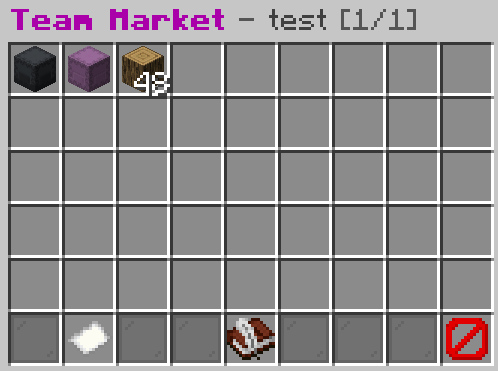 The Team Market browse GUI - players can list and purchase items with their teammates.
Role-based sell multipliers
When a player sells an item to the shop, EzShops looks up their team role and applies a configurable multiplier on top of the base sell price.
| Role | Default multiplier |
|---|---|
| MEMBER | ×1.05 (+5 %) |
| ADMIN | ×1.10 (+10 %) |
| OWNER | ×1.15 (+15 %) |
Multipliers stack with EzBoost bonuses.
Role-based buy discounts
When a player purchases from the shop, their team role reduces the price they pay.
| Role | Default discount |
|---|---|
| MEMBER | −5 % |
| ADMIN | −10 % |
| OWNER | −15 % |
Team treasury
A percentage of every sell transaction is deposited automatically into the team’s shared treasury.
- The split fraction is controlled by
treasury-splitinconfig.yml(default0.05= 5 %). - Any team member can view the treasury balance via
/teamshop treasury. - Members with the
ezshops.teamshop.treasury.withdrawpermission can withdraw funds. - ADMINs and OWNERs can also deposit into the treasury.
Shared team stock
When shared-stock: true, all stock quantities are pooled per team. Every member draws from and contributes to the same pool. This means a team collectively benefits from bulk selling.
Configuration
Enable the integration in plugins/EzShops/config.yml:
teams-integration:
  # Master switch  -  set to false to disable all TeamsAPI features.
  enabled: true

  # Sell price multipliers per role (applied after EzBoost).
  sell-multiplier:
    member: 1.05
    admin:  1.10
    owner:  1.15

  # Buy price discounts per role (fraction subtracted from 1.0).
  buy-discount:
    member: 0.05
    admin:  0.10
    owner:  0.15

  # Fraction of each sell revenue deposited into the team treasury.
  treasury-split: 0.05

  # Pool all team members' stock into one shared balance.
  shared-stock: true
Commands
/teamshop
Opens the Team Shop Dashboard showing your team’s name, current role bonuses, and quick links.
Permission: ezshops.teamshop
Default: true
/teamshop treasury
Opens the Team Treasury GUI.
- View the current shared balance.
- Deposit money into the treasury.
- Withdraw money from the treasury (requires
ezshops.teamshop.treasury.withdraw).
Permission: ezshops.teamshop
Default: true
/teamshop stocks
Opens the Team Stock GUI, listing all items your team currently has in the shared stock pool with amounts.
Permission: ezshops.teamshop
Default: true
/teamshop market
Opens the Team P2P Market GUI where players can list items for sale and purchase listings from teammates.
Permission: ezshops.teamshop.market
Default: true
Permissions
| Node | Default | Description |
|---|---|---|
ezshops.teamshop | true | Access /teamshop and sub-GUIs |
ezshops.teamshop.market | true | Access the team P2P market via /teamshop market |
ezshops.teamshop.treasury.withdraw | true | Withdraw funds from the team treasury |
ezshops.teamshop.admin | op | Administrative access to team stock data |
Data storage
Team data is stored in flat YAML files inside the EzShops data folder:
plugins/EzShops/
├── data/
│   ├── team-stocks/
│   │   └── <teamId>.yml    # shared stock amounts per item
│   └── team-treasury/
│       └── <teamId>.yml    # treasury balance
Data is deleted automatically when a team is disbanded (via TeamDeleteEvent).
Behaviour without TeamsAPI
When TeamsAPI is absent or disabled:
- All sell/buy multipliers are 1.0 (no bonus, no discount).
- The treasury split is 0 (no deduction from sell revenue).
/teamshopshows an error telling the player TeamsAPI is not available.- No team data files are created.